













Five things you should know about Virtual Private Networks (VPNs)
Private information is exposed on the web at an alarming rate. Corporations are selling data for profit, hackers are stealing information and governments are spying. Clearly, it is more critical than ever to keep sensitive information safe. We all want to keep our personal information private, but how can we protect ourselves from having it exposed?
A VPN (Virtual Private Network) is a very common tool to use, mainly for companies but also for private users, to access private content and to keep personal data safe on public Wi-Fi or on home networks. VPN technology helps keeping private information private.
A VPN is often used to extend networks across a public network, and to securely connect two or more networks together. It can enable users to send and receive data across a public network such as the Internet, as if their devices were directly connected to each other.
The VPN is created by establishing a virtual point-to-point or point-to-multipoint connections (sometimes known as tunnels). Following are five things you should know about VPNs:
1. The benefits of using VPNs
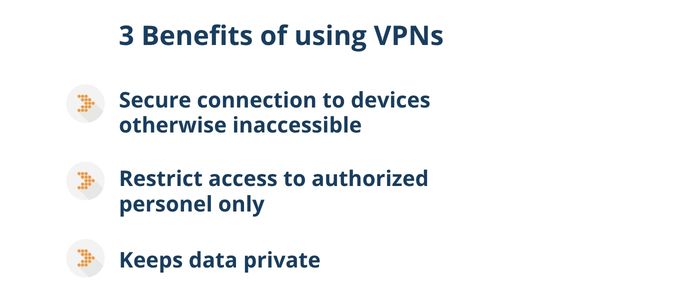
VPNs offer the convenience of connecting and managing devices that would otherwise be inaccessible without physically visiting a site. This is very common practice in an office setting but is also very often useful for people and devices that are mobile, such as field engineers and remote workers.
Aside from the convenience of interconnecting personal networks, another advantage is that access can be restricted to authorised personnel only. As a result, an additional layer of security is provided.
For industrial applications, VPNs enable remote communication between unmanned sites, without compromising the integrity of data during transmission. This allows businesses to use Internet Service Providers (ISP) with complete neutrality, as the data is kept private.
2. Risk of alternative methods
Remote private networks can also be accessed without the use of VPNs. One common method to access remote networks is through port forwarding. Services on a PC or servers generally use standardised port numbers associated with that service. For example, HTTP uses TCP port 80 and telnet uses TCP port 23. Port forwarding uses rules in the firewall to forward data to devices on an internal network, based on the service they want to connect to and its associated port number.
Consider an internal network with a web server hidden behind a firewall. Open access can be given to that web server to anyone on the internet by simply port forwarding data traffic to TCP port 80 on to that web server. This makes port forwarding very insecure and not recommended. It can leave devices open to attacks by anyone on the internet without requiring any authentication.
By introducing a VPN, port forwarding becomes unnecessary to ensure the network remains secure.
3. The different types of VPNs
Remote access and remote monitoring
The ability to remotely manage devices on an internal network is very convenient, however poorly managed networks can leave systems exposed and vulnerable. Remote access removes the need for engineers to have to go to the site, thus reducing the carbon footprint and enable autonomous systems for everyday life.
One method to secure a network between one or more sites, an end user can use a VPN client. This is a piece of software that runs on a PC or Laptop, which with internet access and appropriate authentication credentials, provide access between end user and end device. Therefore, engineers and administrators can access the network remotely, even when working from home or whilst travelling. This allows provides instant access to be able to act quickly and conveniently when necessary.
Alternatively, A LAN-to-LAN VPN connection enables internal networks, which are sometimes geographically separated, to be inter-connected from anywhere in the world. Remote internal networks can be connected over secure links so they can operate and communicate as if they were in the same location. LAN-to-LAN VPNs enables machine-to-machine and client-to-server connectivity, making site-to-site communication for many industrial applications possible.
4. Safeguarding your data with authentication and encryption
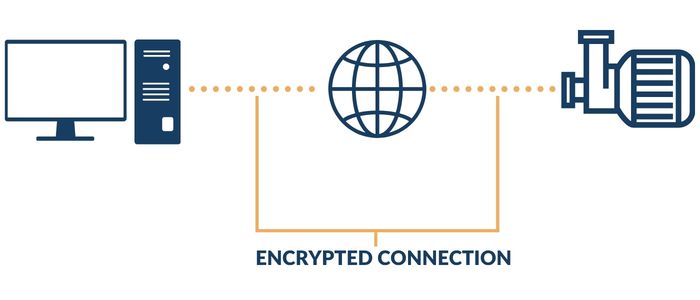
The internet is a completely open and insecure network environment. VPNs offer a secure link between your local device and remote networks. There are several layers of security and depending on the type of VPN, this is controlled in different ways. All VPNs, however, function on the basis of authentication and encryption.
Authorization
In order to establish a VPN, the VPN endpoints must prove they are authorised to communicate with each other. A VPN endpoint could be an engineer with a VPN client running on a laptop to a VPN server, or a pair of routers connecting two or more remote networks. There are many different options.
Usually, authentication involves one or more identifications and a pre-shared secret (similar to a password), or a set of virtual certificates. The latter should be very closely controlled as they contain pre-established credentials. In either case, both sets of credentials are exchanged at the beginning of the process. These credentials are checked and compared with databases on both sides. If the credentials match, the process of establishing a VPN can continue.
Authorisation is like entering an office building. At the entrance, you will need to provide your personal information to a security guard. This information is checked to see if you are an authorised visitor. Access will be denied if your details are not on the list. Once your credentials are approved, you can proceed into the building.
Encryption
Encryption algorithms and virtual keys are used to secure data transfers. During the process of negotiating a VPN, the VPN endpoints agree on the type of encryption algorithms to use. Data is encrypted by encapsulating it in secure packets, which require a virtual key to encrypt and decrypt the data.
The public and private virtual keys required for encrypting and decrypting the data are then automatically generated. The VPN server uses the public key of the VPN client to encrypt the key and then sends it to the client. The VPN client then decrypts that message using its own private key, and vice versa.
All of this work is handled by the VPN server and client themselves. To ensure the VPN can establish and operate correctly, it is crucial to verify that the configuration matches on both ends. Any mismatch will prevent the tunnel from negotiating, resulting in no secure connection between sites.
5. Wireguard, OpenVPN or IPsec?
Within WeOS 5, there are a few different options to configure your VPNs with. This all depends on what type of application you require, or features that fit your security posture. You have the option to configure either an SSL VPN or an IPsec VPN. SSL has two different options, OpenVPN and Wireguard. IPsec is a protocol in its own right, just as SSL is.
SSL VPN
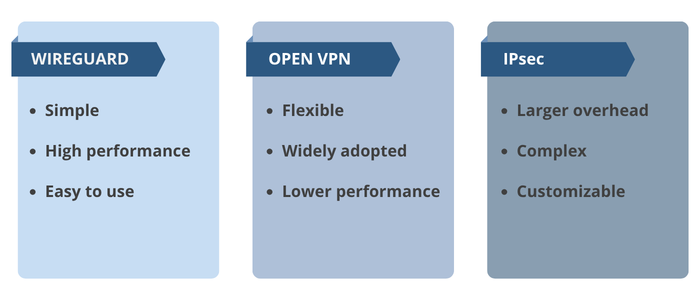
SSL VPNs are simple to setup, with easy manageability, and are a low cost solution. Remote access scenarios tend to use this type of VPN due to these reasons. The VPN router on the remote network usually connects directly to the SSL VPN server with a persistent connection. Users can then import a VPN file obtained from a network administrator into their VPN client software (e.g., OpenVPN or Wireguard) and run the VPN client whenever they need remote access.
The VPN gateway router on a remote network can either import VPN files or, in some cases, require only text strings for the network ID and a one-time password to connect the VPN.
There is an option to self-host SSL servers or can use a third-party SSL VPN cloud service such as WeConnect.
Wireguard is a stepup from OpenVPN, which lowers compliexity and increases performance. This means that for networks that require higher bandwidth, Wireguard is a more preferrable choice.
IPsec VPN
IPsec VPNs may have a larger network overhead and may be more difficult to setup, requiring expert knowledge and support. Though, the advantage of IPSec VPNs is that each component of the configuration can be customised. From authorisation, pre-shared secrets, or certificates, to the type of algorithm used for the authorisation and encryption processes, all the way down to which IP address ranges are authorised to communicate with one another. In addition to VPN device setup, certificate management is another important component of running IPsec VPNs.
Choosing the right VPN technology
Conclusion
Virtual Private Networks help make life easier as they offer privacy, especially when using open and insecure networks, such as the Internet. They provide convenient access and protection to remote locations with secure authorisation and encryption, whether an SSL VPN (Wireguard or OpenVPN) or IPsec VPN are deployed. VPNs enable site-to-site and multi-site communication, reducing the requirement for engineers to be on site and for systems to operate autonomously, safely and securely.
See also
Six easy steps to secure your networking device
To reduce the risk of cyber attacks and increase network security, we have developed six simple steps that you can follow.
What is PoE?
Wondering what benefits PoE switches offer in an industrial network? How smart is PoE, and what is the difference between PoE and PoE+? Find out in this blog post.
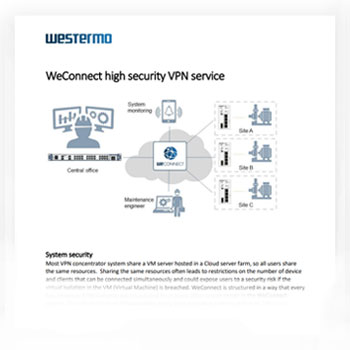
WeConnect - All you need to know in one document
This document gives you a simple and straightforward technical overview on how high security VPNs can be achieved using WeConnect. You will learn how our service provides top system security through encryption techniques, firewalls, and data management.
Download PDFCarl de Bruin
International Sales

For support inquiries, click here to contact Technical Support